The XChaCha20-Poly1305 explainer: the cipher behind your vault
The cipher quietly protecting your Pwdly vault — and why we picked it over the AES-GCM that almost every other password manager defaults to.
Every password manager ends up making the same handful of cryptographic choices. Pick a way to turn a master password into a key. Pick a cipher to encrypt the vault. Pick a way to prove the ciphertext hasn't been tampered with. The choices aren't dramatic — they're all "secure" in the lay sense — but the trade-offs are real, and a few of them matter quite a lot the day something goes wrong.
This is a tour of the cipher we picked: XChaCha20-Poly1305. What it is, why it exists, and why we use it instead of the AES-GCM you'll find under the hood of almost every competitor.
The 30-second version
Your Pwdly vault is encrypted on your device with XChaCha20-Poly1305, an AEAD cipher (Authenticated Encryption with Associated Data). The key is derived from your master password with Argon2id — never sent to us, never recoverable by us. The encrypted blob is what hits our servers. If it leaks, it leaks as opaque bytes.
We talk through that scenario end-to-end in Threat Model Tuesday: what happens if Pwdly gets breached tomorrow?.
What does "XChaCha20-Poly1305" actually mean?
It's two pieces glued together into a single AEAD construction.
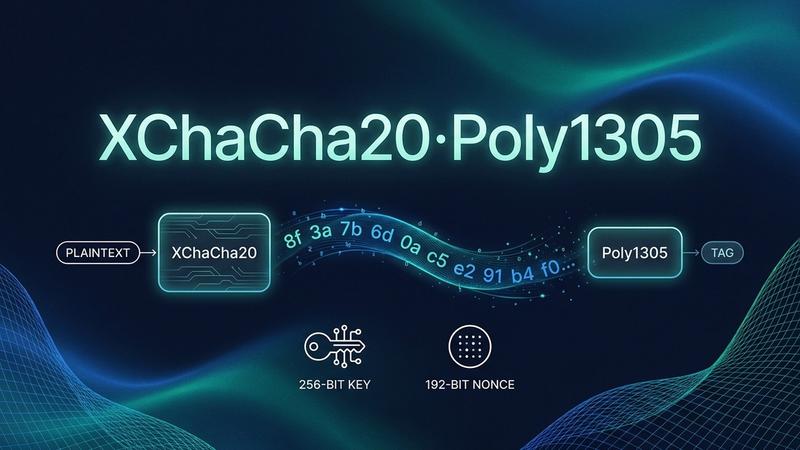
ChaCha20 is a stream cipher designed by Daniel J. Bernstein in 2008. You feed it a 256-bit key and a nonce ("number used once"), and it produces a stream of pseudo-random bytes that you XOR with your plaintext. To decrypt, you generate the same stream and XOR again. It's simple, very fast in software, and constant-time on basically every CPU.
Poly1305 is a one-time message authentication code, also from Bernstein. It produces a 128-bit tag that proves the ciphertext (and any "associated data" you bind to it, like a vault item ID) hasn't been modified. Change a single bit and decryption fails loudly instead of returning quiet garbage.
The combination — ChaCha20 for confidentiality, Poly1305 for integrity — is standardised as RFC 8439 and is what powers TLS 1.3 on most non-Intel hardware, WireGuard, and Signal.
XChaCha20 is the "extended-nonce" variant. Standard ChaCha20 uses a 96-bit nonce, which is small enough that you have to be very careful never to reuse one with the same key. XChaCha20 uses a 192-bit nonce, which is large enough that you can generate one with /dev/urandom for every single encryption and the probability of a collision stays negligible essentially forever. The construction is described in draft-irtf-cfrg-xchacha and is the default secret-key AEAD in libsodium, which is the library we use.
What everyone else uses
Most of the password-manager industry standardised on AES-256-GCM or AES-256-CBC + HMAC-SHA256. Both are fine ciphers. They're also both noticeably more fragile than XChaCha20-Poly1305 in ways that matter once you start thinking adversarially.
1Password — AES-256-GCM
1Password encrypts vault items with AES-256-GCM, and derives keys from your master password using PBKDF2-HMAC-SHA256 (currently 650,000 iterations), additionally mixed with their 128-bit account-bound Secret Key. The Secret Key is what makes a brute-force attack against a stolen 1Password vault genuinely infeasible — it's the architectural decision people quote most often, and it's a good one.
It does mean that if you ever lose your Secret Key, your data is unrecoverable. Same end-state as a forgotten Pwdly master password, just reached via a different route. Source: 1Password Security Design white paper (PDF).
LastPass — AES-256-CBC
LastPass uses AES-256-CBC with PBKDF2-SHA256. After the 2022 breach exposed encrypted vaults to attackers, they raised the default PBKDF2 iteration count to 600,000 — but vaults that had been created with older defaults (sometimes as low as 5,000 iterations) were leaked with that weaker stretching baked in, which is the core of the ongoing aftermath. Sources: LastPass: Notice of Recent Security Incident, LastPass on password iterations.
Bitwarden — AES-256-CBC + HMAC-SHA256
Bitwarden encrypts with AES-256-CBC and authenticates with a separate HMAC-SHA256 ("encrypt-then-MAC"). For key derivation they default to PBKDF2-SHA256 at 600,000 iterations and now also offer Argon2id as an opt-in alternative. Their architecture is well-documented and open source. Source: Bitwarden Security Whitepaper.
Dashlane, Proton Pass, Keeper
Dashlane uses AES-256 in CBC mode with Argon2d for KDF (Dashlane security white paper). Proton Pass leans on OpenPGP (which is AES-256 under the hood) via OpenPGP.js (Proton Pass security model). Keeper uses AES-256-GCM with PBKDF2-SHA256 (Keeper Encryption Model).
Notice the pattern: AES, AES, AES, AES.
Why we didn't just pick AES-GCM
AES-GCM is a perfectly good cipher when you use it correctly. The catch is that "correctly" is harder than it looks.
1. AES-GCM is brittle around nonces
GCM uses a 96-bit nonce. If you ever encrypt two different messages with the same key and the same nonce, an attacker can recover the authentication key and forge arbitrary ciphertexts. Not "weaken security a bit" — completely break authentication for that key. This isn't theoretical: it's bitten cloud providers, VPN implementations, and TLS stacks over the years.
XChaCha20's 192-bit nonce makes the safe path the easy path: generate a random nonce per encryption, never think about it again, and the math says you won't collide for longer than the heat death of the average startup.
2. AES is uncomfortable to implement safely in pure software
Hardware AES (AES-NI on x86, the ARMv8 crypto extensions on most modern phones) is fast and constant-time. Pure-software AES — which you fall back to on older devices, in some browsers, and in some WebAssembly contexts — is hard to make constant-time, which historically has meant cache-timing side channels. ChaCha20 was specifically designed so that a naive software implementation is already constant-time. There is no fast path and slow path; there's just one path, and it's the safe one.
This matters a lot for a client-side encryption product running in browsers and on a long tail of devices we don't control.
3. libsodium is genuinely misuse-resistant
We use libsodium (via libsodium.js) for every crypto operation in Pwdly. It's small, audited, and exposes high-level primitives like crypto_aead_xchacha20poly1305_ietf_encrypt that are very hard to use incorrectly. You can't accidentally forget the MAC. You can't pick a weird mode. The 192-bit nonce removes the most common footgun. Less surface area for us to mess up means less surface area for you to get hurt by.
What about Argon2id?
Encryption is only as strong as the key feeding it. If your master password is correcthorsebatterystaple and we turn it into a key with a fast hash, an attacker with a stolen ciphertext can guess billions of candidates per second.
We use Argon2id — winner of the Password Hashing Competition — with parameters tuned to make each guess slow (CPU work) and memory-hungry (~64 MB of RAM per attempt). That memory cost is the thing PBKDF2 lacks; it's why GPU and ASIC farms don't help attackers much against Argon2.
PBKDF2 — used by 1Password, LastPass, and Bitwarden's default — is fine, but only because the iteration counts have been ratcheted up dramatically (and largely because of incidents like the LastPass breach). Argon2id was designed from the start to be expensive in a way that scales against modern attacker hardware.
Bitwarden and Dashlane have both moved to Argon2-family KDFs. We did the same, by default, from day one.
What this looks like in practice
When you save an item in Pwdly:
- Your browser asks libsodium for a fresh 192-bit random nonce.
- The item is encrypted with
crypto_aead_xchacha20poly1305_ietf_encrypt, using the vault key derived from your master password via Argon2id. - We bind the item's ID and version as associated data — so an attacker can't shuffle ciphertexts between items even if they get the encrypted blob.
- The ciphertext + 16-byte Poly1305 tag + nonce is what reaches our servers.
When you read it back, the tag is verified before the plaintext is exposed. A flipped bit anywhere — by an attacker, a corrupt disk, a malicious proxy — produces a hard failure, not silently-wrong data.
We walk through what an attacker would see if they stole that blob in Threat Model Tuesday. The short version: opaque bytes, plus a master-password guessing game with Argon2id in the way.
So is XChaCha20 "better than" AES-GCM?
Not really. Both are excellent. AES-GCM with disciplined nonce management and hardware acceleration is fast and secure. We'd happily trust either.
What XChaCha20-Poly1305 gives us is a slightly different set of trade-offs that fit a zero-knowledge, browser-first password manager well: misuse-resistant nonces, constant-time everywhere, one library, one primitive, fewer footguns. When the same code has to run on your phone, your laptop, an obscure Linux distro, and someone's eight-year-old Android tablet, the cipher whose safe path is the only path is the cipher we want.
You can read more about our overall architecture in How Pwdly Works and our Security Page.
Sources & further reading
- RFC 8439 — ChaCha20 and Poly1305 for IETF Protocols
- draft-irtf-cfrg-xchacha — XChaCha: eXtended-nonce ChaCha
- libsodium: XChaCha20-Poly1305 construction
- 1Password Security Design (PDF)
- Bitwarden Security Whitepaper
- LastPass: Notice of Recent Security Incident (Dec 2022)
- LastPass on password iterations
- Dashlane Security Whitepaper (PDF)
- Proton Pass security model
- Keeper Encryption and Security Model
- Password Hashing Competition — Argon2